General Settings Screen
The General Settings screen is used to define basic settings for the XtreamService application, such as dealership sales goals and inventory price settings. Once settings have been defined, click the UPDATE button to save the settings.

|
To access the General Settings screen, click the |
 (More) icon and then click the General Settings link in the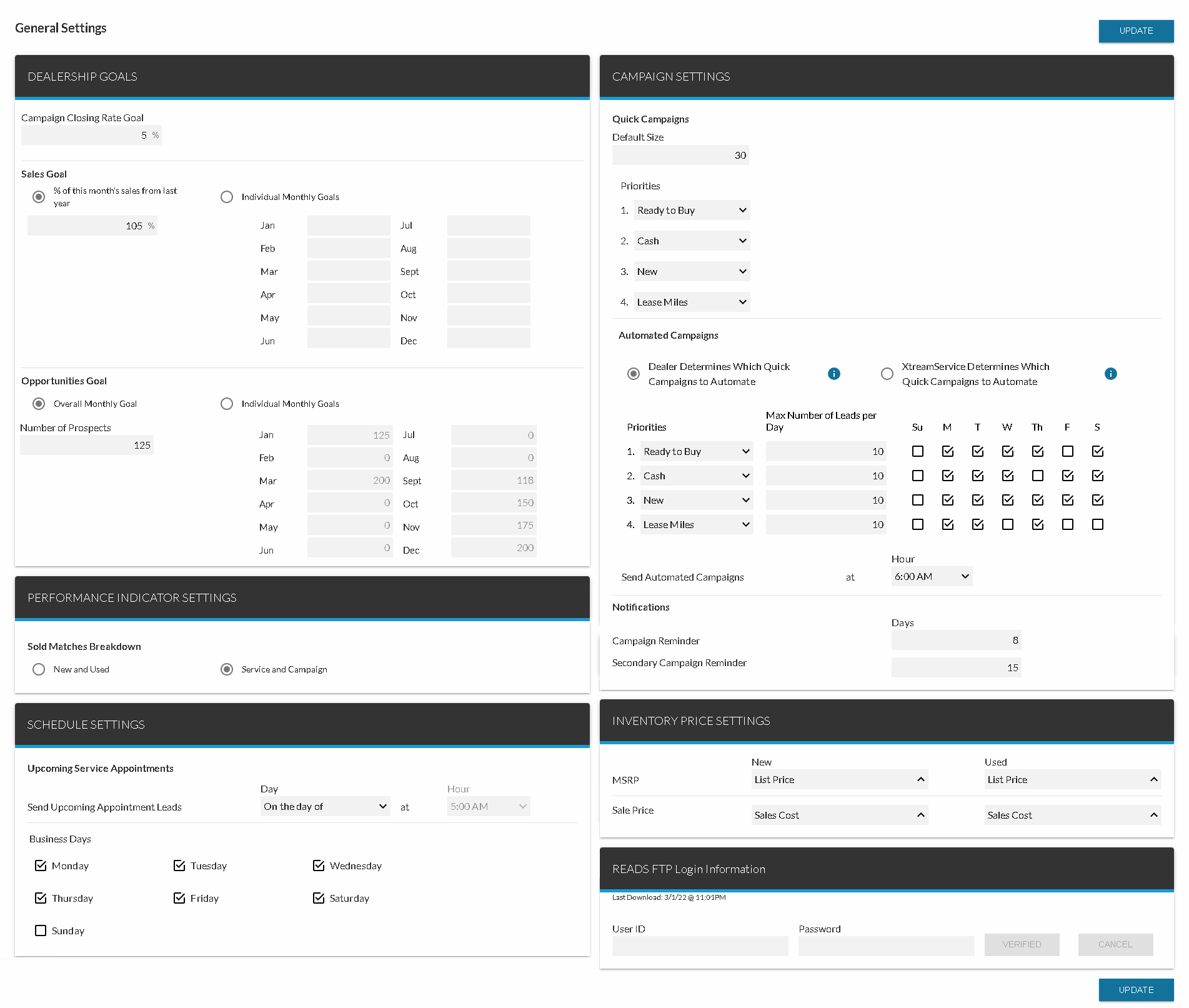
The following panels are available on the General Settings screen.
-
Dealership Goals panel. Define sales goals for the dealership and goals regarding the number of leads contacted by dealership personnel.
-
Campaign Settings panel. Define settings for quick campaigns, such as the maximum number of leads that can be included in a quick campaign.
-
Performance Indicator Settings panel. Define whether the Sold Matches performance indicator displays information about the type of vehicle sold, such as new or used, or about the source of the sale, such as a campaign or a service interaction.
-
Inventory Price Settings panel. Define which prices from the dealer management system (DMS) display for a vehicle's manufacturer suggested retail price (MSRP) and sale price.
-
Schedule Settings panel. Define settings for automatically sending leads for service appointments to FOCUS in the Digital Retail Platform.
-
READS FTP Login Information panel. Define settings for integration between the Honda READS program and the XtreamService application.
Click here for a list of products that may be mentioned in this help file.